Find new customers
Choose the business types and regions you want to sell to. Build a prospect list, find published contact details and track your conversations.
Your next business connection starts here
Your target. MapFirms searches. Enter a business type, product or service; choose your region and sources. Bring research, first contact, quotes and follow-ups into one workspace.
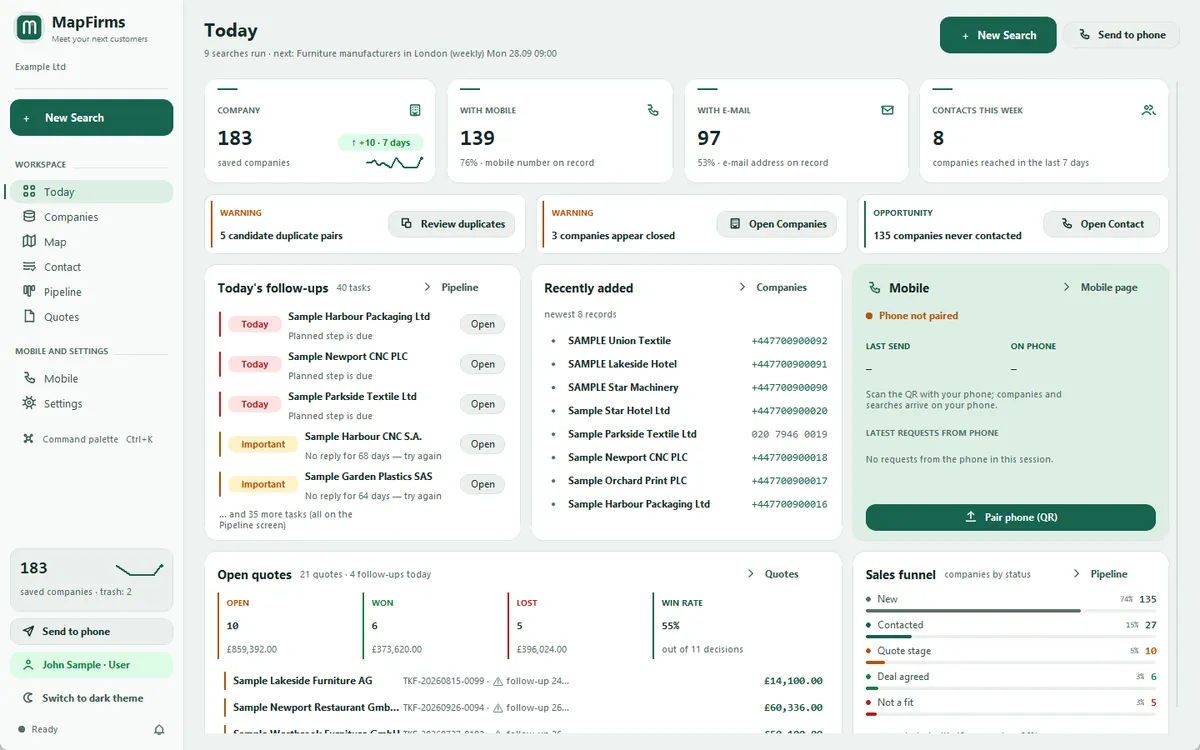
Search. Explore. Connect. Follow up.
You know who you want to find. MapFirms speeds up the research.
Choose the business types and regions you want to sell to. Build a prospect list, find published contact details and track your conversations.
Research businesses offering the products or services you need. Review company information, compare your options and get in touch.
Explore companies in your sector and the regions where they operate. Review company records and available activity information together.
The Easy Search guide highlights the actual controls in the app. It ends when your search starts, leaving you in control.
Choose customers, suppliers or competitors. Enter a business type, product or service. You decide which businesses to target.
Select a country and narrow it down by region or city. Focus your research on the market you want to reach.
Choose the sources you want from the visible list. See why a source is unavailable in your selected region.
Review your choices and start. Explore results, view companies on the map and begin your outreach.
The company you researched, the person you contacted, the quote you prepared and your next follow-up: all in one workspace.
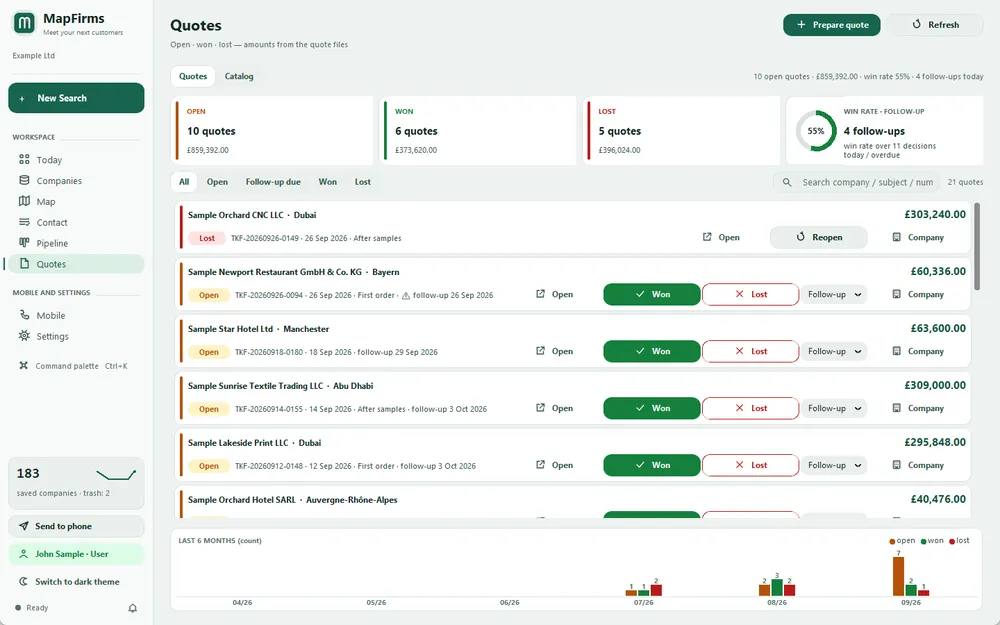
Drag companies from stage to stage, create quotes with VAT and discounts, and see open, won and lost amounts with your win rate. The catalog remembers every item you have quoted.
Choose from 195 countries and 3,399 regions. Your search terms are translated into each target country’s language, so “furniture” is also searched as “Möbel Hersteller” in Germany. Scan around a point, go district by district with City focus, or let searches repeat every week.
MapFirms reads up to seven pages of each company’s own website (home, contact, about and up to two product pages) for e-mail addresses, extra phones, WhatsApp, social profiles and the contact person. The “Where from?” log shows on which page and when each value was found.
Build a call list, call from your phone or through Phone Link, open WhatsApp and e-mail drafts filled in from your templates, and record each outcome with one key. Follow-up dates are set for you.
See your companies as clusters on the map, check which searches came back empty and spot the regions where you have no customers yet.
Each company gets a priority score from 0 to 100. Filter by e-mail, distance, status or tags, and read the talking points before you call.
Export to Excel, CSV, Google Contacts, Outlook or vCard, add follow-ups to your calendar and import the Excel or CSV lists you already have – duplicates are merged.
English, Turkish, German, French, Spanish and Arabic, with an illustrated user guide in every one of them.
Data completeness, activity matches with your target terms and field provenance are shown separately. Without enough activity information, the match stays “Unknown”. A complete record does not establish buying intent.
The full version includes MapFirms Mobile, a web app for Android and iPhone – no app store needed. Pair it with a QR code and your companies travel from your PC to your phone end-to-end encrypted, so our server cannot read them.
Your companies, notes and quotes are stored in a database on your own computer, not in someone else’s cloud.
A plain comparison with the way most small sales teams research leads today.
| Task | By hand | With MapFirms |
|---|---|---|
| Finding companies | Search town by town on a map site and copy every result | One search across regions and sources; companies you already have are enriched, not added again, and duplicates can be merged |
| Contact details | Open every website and hunt for the contact page | E-mails, phones, WhatsApp links and contact names read from company websites |
| Keeping track | Spreadsheets, sticky notes and memory | Pipeline stages, a timeline per company, reminders and a Today screen |
| Quotes | A separate document for every customer | Quotes created from the company record and tracked until won or lost |
| On the road | Printouts and screenshots | The same list on your phone, encrypted (full version) |
Download the app, accept the agreements and create your free account with your email. Add up to 30 new companies per installation with all desktop features, without a time limit or payment card. A verified Premium purchase upgrades the same account and keeps your companies.
Free account · No card required
Yearly subscription
See the yearly price on the buy page.
Buy the full versionNew subscriptions purchased under these terms do not include an additional unconditional money-back guarantee. Try the free version before purchasing. Statutory withdrawal rights and remedies for faulty or undelivered products or services remain unaffected. Refund and withdrawal terms
The subscription renews automatically every year until you cancel. You can cancel at any time and keep access until the end of the year you have paid for.
Creem (Armitage Labs OÜ, Estonia) is the Merchant of Record. Contact destek@mapfirms.com for product support and refund requests.
By default, in Overture Maps open data, which covers the whole world, and – where one exists for the country you search – in official company registers. The registers of France, Norway, Finland and Czechia work without a key; those of the United Kingdom and Mexico open with a free API key; the global LEI index GLEIF can be chosen as well. Contact details are then read from each company’s own website, and the “Where from?” log keeps the page each value came from. You can also tick other optional sources in the search form. MapFirms works with publicly accessible data and pages only.
On your own computer. Companies, notes and quotes are kept in a local database in your Windows user folder. Our server holds your account and – if you pair a phone – end-to-end encrypted packages it cannot read. Update checks and the optional YouTube check also contact our server; the privacy notice lists exactly what is processed.
From the Contact screen or the phone app: call with one click, or open a WhatsApp chat or an e-mail draft filled in from your own templates. You review every message and press send yourself, then log the outcome with a single key.
THE PROSPECTING PLAYBOOK
Practical guides to finding B2B prospects, checking company information and building useful Excel or CSV lists with MapFirms.
Company discovery
A practical workflow for finding potential business customers by sector and location, then checking whether each company fits your offer.
Lists and follow-up
Turn search results into a clean prospect list: check duplicates, preserve sources and export company records for your next sales task.
Sources and data quality
Understand Overture Maps, official company registers and business websites, and learn what to check before relying on a company record.
Company discovery
Choose between referrals, local company research, trade shows, useful content and follow-up. Turn those channels into a practical weekly sales routine.